How to launch a loyalty program for an online or Instagram store in 1 day
In this guide, we’ll walk you through how to launch a loyalty program in just one day without any development work using EfirCards, how to issue a card to a customer, how to set up rewards, and how to integrate all of this into your online business.


A step-by-step guide without development
According to e-commerce research, 70 to 90% of shoppers don't return to a store after their first purchase. It's not always because they didn't like it — they simply forgot about it, found another option, and had no reason to return.
Meanwhile, the cost of acquiring new customers continues to rise: the cost per click in targeted advertising has increased exponentially over the past few years. Businesses are spending their budget on new customers, while existing ones disappear without a trace.
The key is retention. Repeat sales are 5-7 times cheaper than acquiring a new customer. And a loyalty program is one of the most proven tools for turning one-time customers into regulars.
In this article, we'll show you how to launch a loyalty program for an online business in just one day, without development or technical expertise, using a real-world case study and step-by-step instructions on the Efircards platform.


Who is this suitable for?
A loyalty program works for any online business that has repeat purchases or the potential for them:
- online stores of any niche - from clothing to cosmetics;
- shops on Instagram and other social networks;
- food, flower, and grocery delivery services;
- online services with regular demand (salons, clinics, education).
A simple test: if you already have at least a few dozen clients, you need a loyalty program; without one, you're losing money every day.
How a loyalty program works: a basic scheme
The principle is simple:
- The customer makes a purchase.
- Receive a bonus card (or it is created automatically upon your first order).
- Bonuses are credited to the card for every purchase.
- The customer uses the accumulated bonuses for the next order.
- Returns again - the cycle repeats.
In practice, it works like this: a customer makes a purchase for 1,000 UAH and receives 50 bonus points (5% cashback). They use them as a discount on their next order. The incentive to return is clear and specific.

Step-by-step instructions: launching a loyalty program through Efircards
Step 1. Register in the system
Go to efircards.com and register. The process takes about 2 minutes:
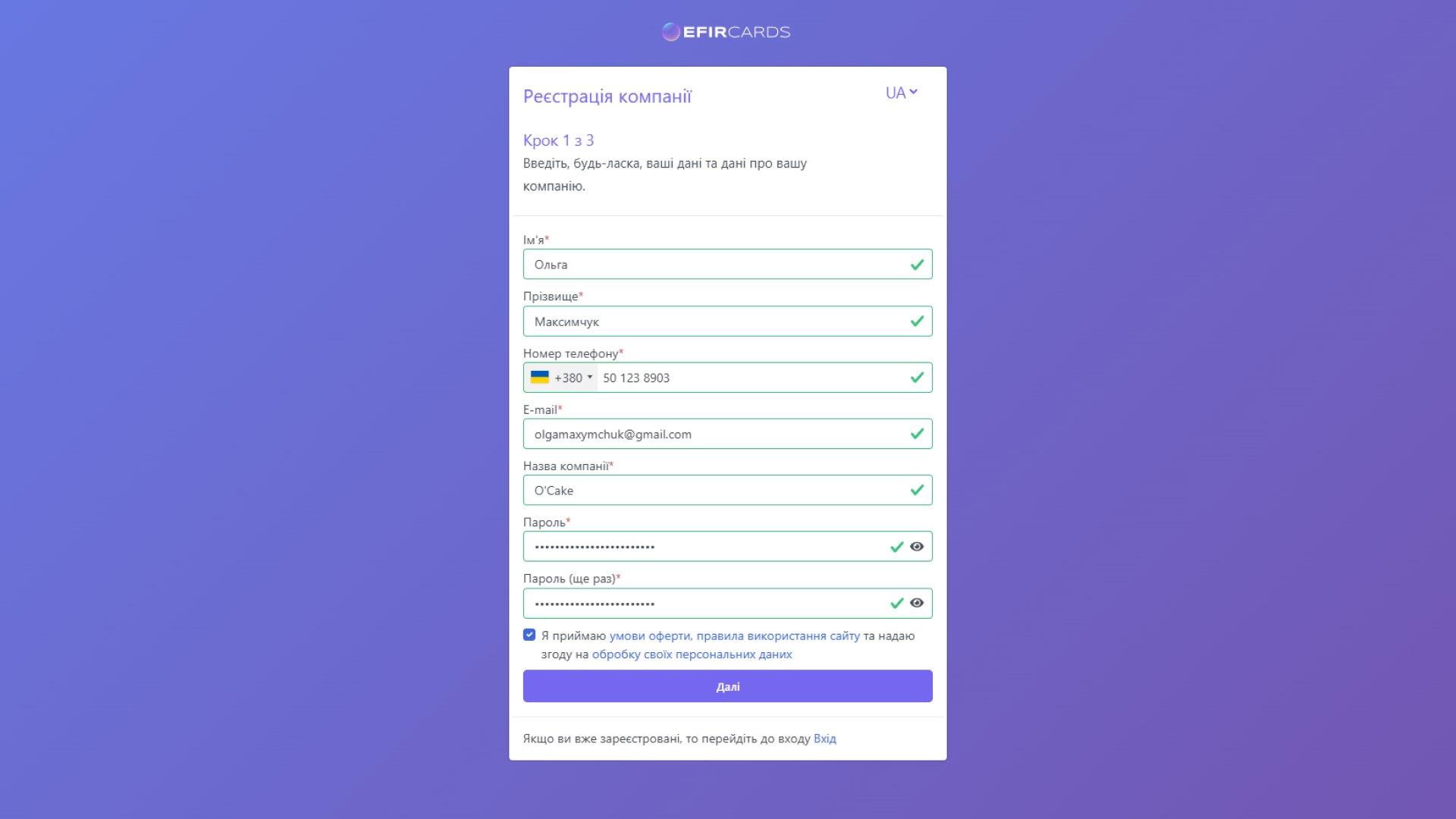
1. On the first screen, you need to enter standard information: name, email, company name, phone number, and create a password.
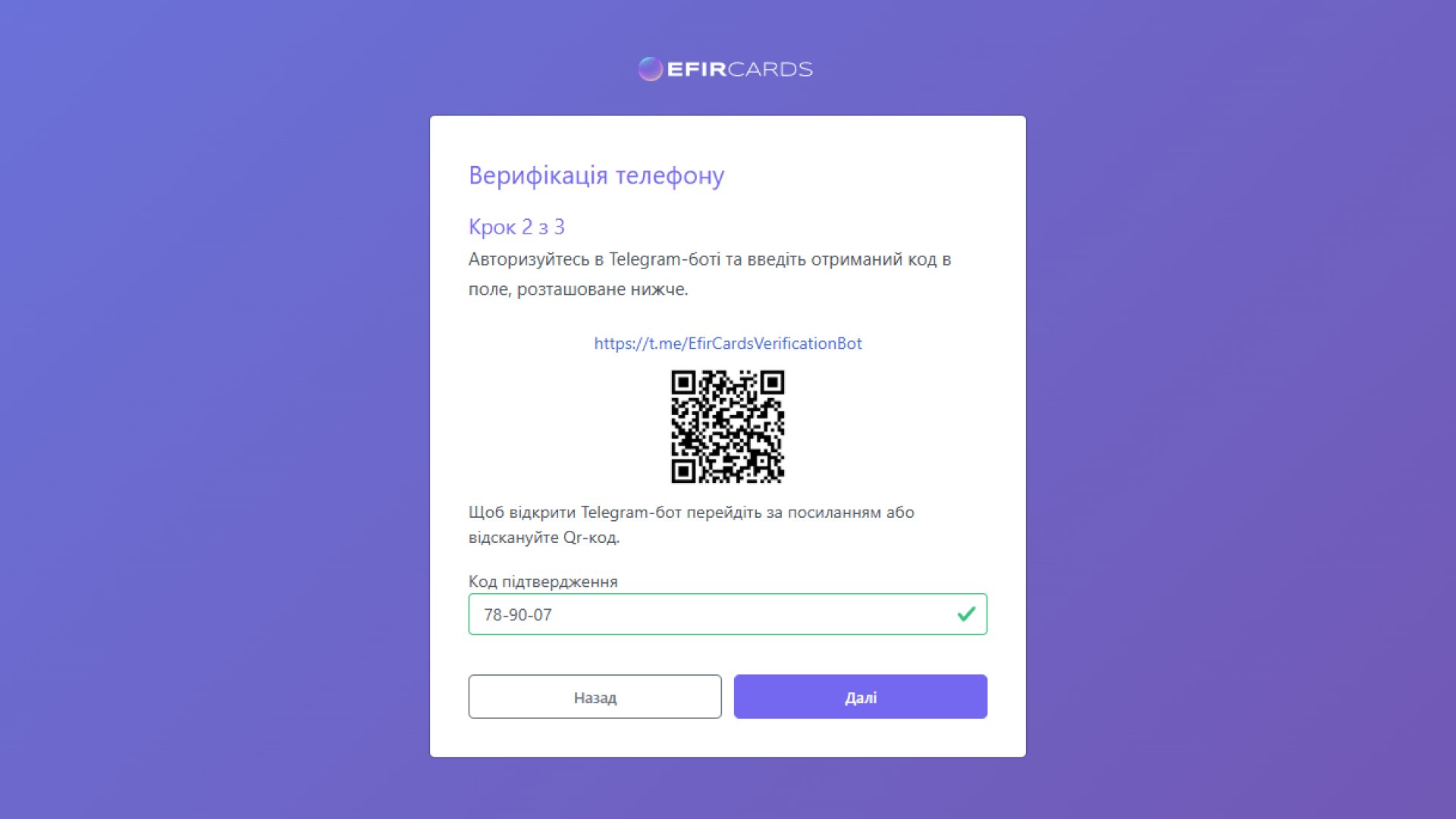
2. The second screen is phone verification via the Telegram bot (you need to scan the QR code on the screen, go to the bot and receive the registration code from it).
3. The third screen is email address verification, as usual: you'll receive a code in your email that you need to enter in the appropriate field. Be sure to check your Spam folder; sometimes the email containing the code ends up there.
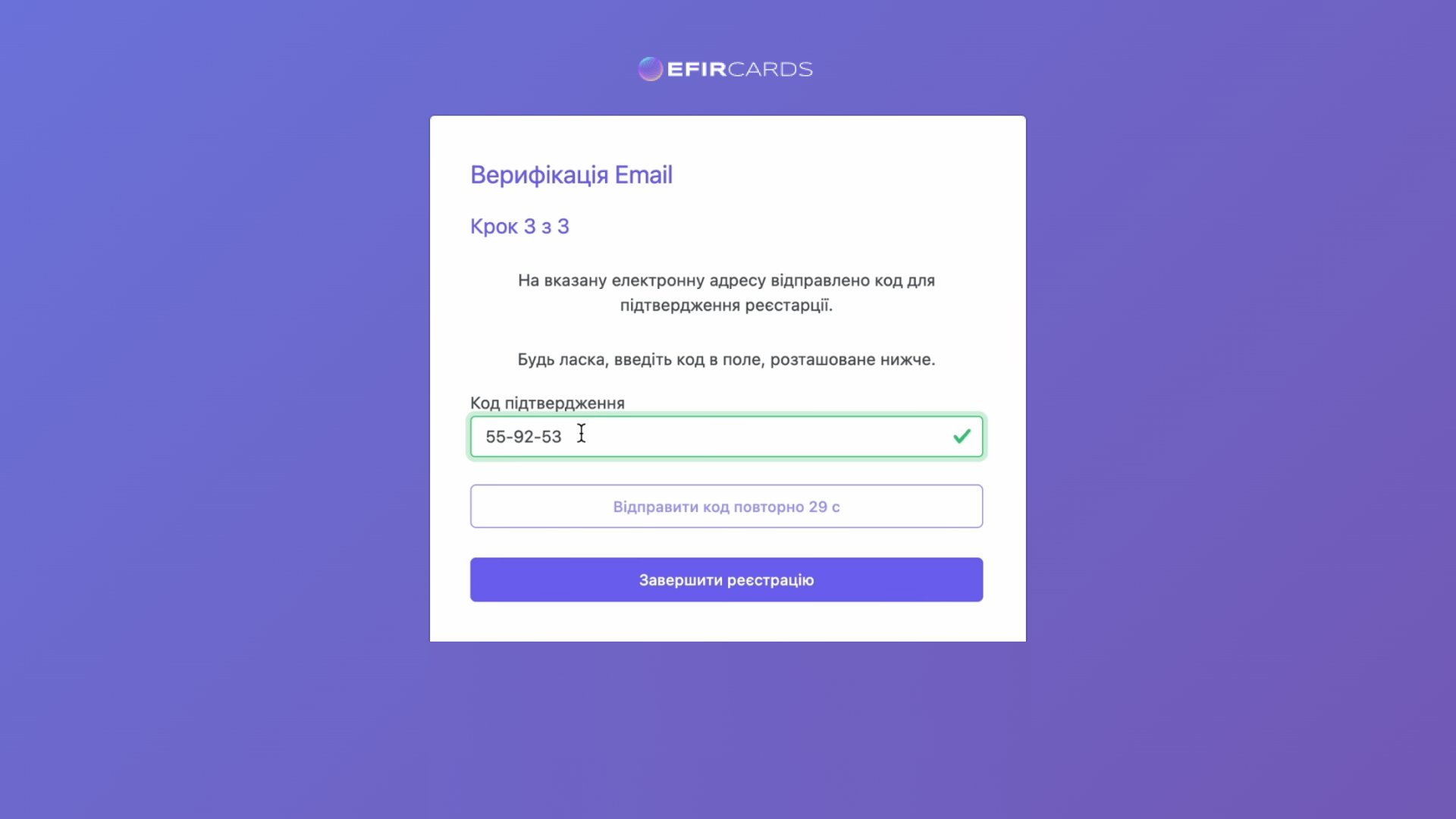
After this, you will have to wait some time until your profile is approved on the site, and a manager will contact you to confirm access.

Step 2: Creating a Loyalty Program
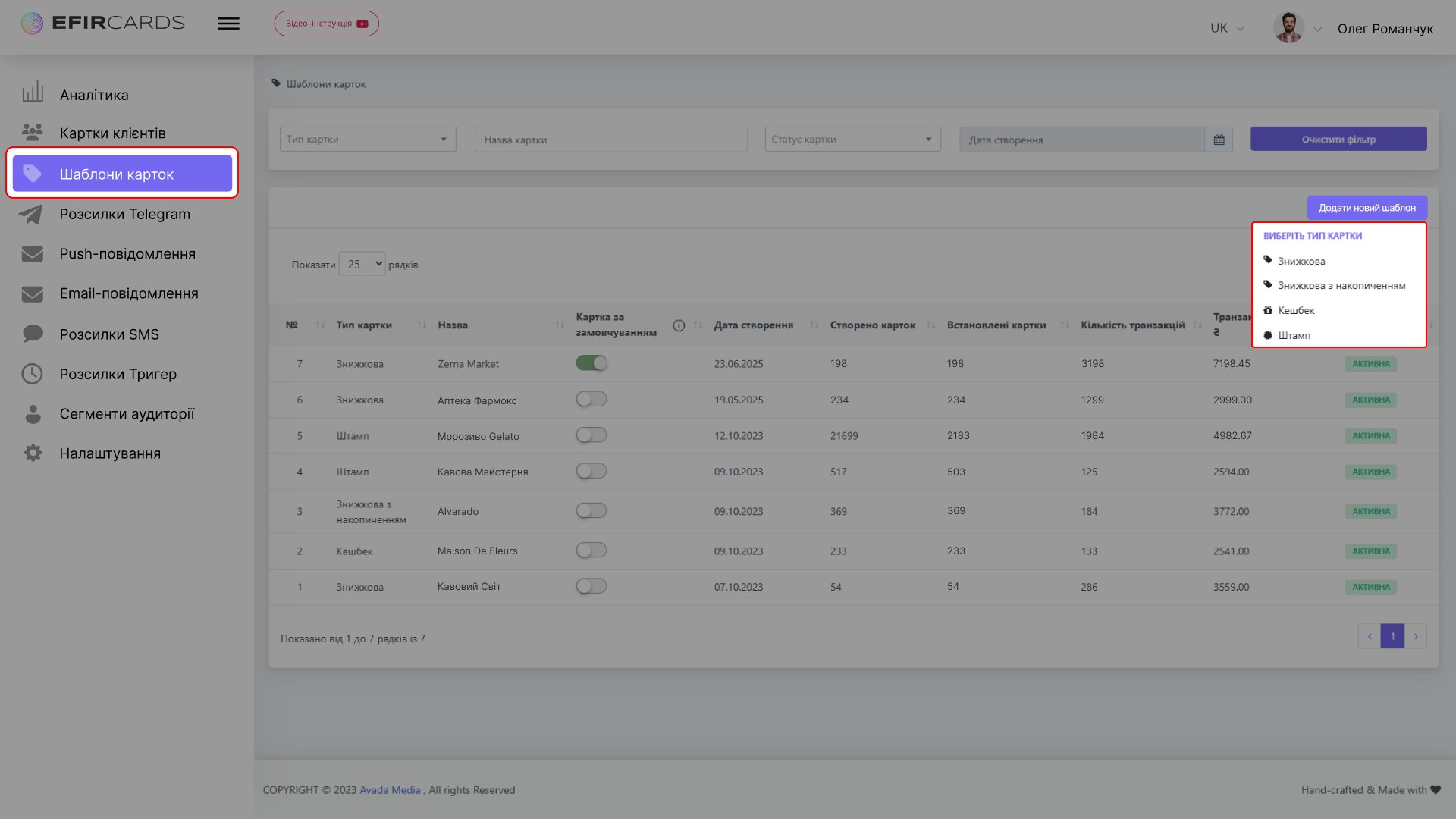
In the menu on the left, select "Card Templates" > "Add New Template" and choose one of the card types:
- Card type - discount, discount with accumulation, stamp, or cashback.
What to choose for e-commerce:
- A discount card is the simplest option; it provides a fixed discount on the card.
- A discount card with accumulation is a way to motivate customers to increase their check amount to receive a higher percentage discount.
- Cashback is a percentage of the order amount returned, converted into bonuses on the website. These bonuses are perceived as "real money," so they're a great way to retain users.
- A stamp is suitable for businesses with frequent small purchases: coffee shops, bakeries, food delivery. The logic is simple: buy 9 times, get the 10th one free. The customer sees progress and is eager to fill it.
Step 3. Setting up bonus accrual rules
By selecting the desired template, you set the program's operating logic, depending on the map type. For example:
- “5% cashback” for the Standard card, “10% cashback” for the Premium card;
- "25 bonuses upon registration" - a welcome bonus for new members
- "Bonuses can be written off up to 50% of the order amount" - a limitation that protects the margin;
- fixed discount of 10% and increase of discount to 15% if the order amount reaches 10,000 UAH;
- maximum number of stamps.
We recommend starting with simple terms: for example, 3% of the order amount. This is clear to the client and doesn't put a strain on your budget.
⚙️On the first screen Settings, you can set the card name, status/level, discount percentage, and customize the registration form for each card type — select languages (Ukrainian, Russian, and English), title, input fields, and personal data use policy.

🎨Map design
After setting up the basic logic of the loyalty program, you proceed to the next screen - Card Design.
In the editor you can:
- Add company logo.
- Change background colors.
- Upload background map image.
- Add a QR or barcode to the front of the card.
- Add Google icon.

ℹ️Information stored on the card
Once you have completed customizing your loyalty card design, you will be taken to the final screen - Information.
Here you can include not only basic company information but also a description and benefits of your brand. You can also add clickable links to your website, social media, active phone number and email address to the map, making customer interactions even more convenient.

Step 4: How the client receives the card
There are two main scenarios.
Option 1 - via the website
A "Get Card" button or registration widget is placed on your website. The customer fills out the required fields during registration, and the card is created instantly.
Option 2 - via Instagram or landing page
A link to the program page is included in the profile bio. Customers click it, fill out a short form, and receive a card. This option is especially effective for stores that operate primarily through social media.
Step 5. Client base
If you already have clients, there's no need to start from scratch. Your existing database can be imported into the system as a single file, and all participants will receive cards immediately.
New clients can be added manually, for example, if a client contacts you directly through social media or by phone.
Communication channels
In the account, you can configure the channels through which the client receives the card and all subsequent notifications. Available options:
- Telegram bot - the client receives the card directly in the messenger;
- Email newsletter - the card and bonus notifications are sent to your email;
- Push notifications (for iOS) - notifications on your phone;
- Telephone mailing - SMS with notification about bonus accrual.
Choose the channel that's most convenient for your audience, or combine several. A reminder that "You've accumulated 150 bonus points" at the right time and on the right channel is what keeps customers coming back for their next purchase.
Step 6. What the client's card looks like
After registration, the card is automatically added to Apple Wallet or Google Wallet, depending on the customer's device. The card displays:
- your brand name and logo;
- current bonus balance;
- card number or QR code for identification.
The client carries the card on their phone, without plastic or cardboard cards that get lost or separate applications that need to be installed.

Step 7: How the customer uses the card to make a purchase
When placing an order, the customer enters the email or phone number linked to the card; the system automatically identifies it and awards bonuses.
If you want to speed up the process, the customer simply shows the QR code from the card. For online stores, the standard scenario is as follows:
- The customer enters an email when placing an order.
- The system finds the card and awards bonuses after payment confirmation.
- The client sees the new balance in the Wallet.
Step 8. Website Integration
Many people expect difficulties here, but in vain. There are two options:
API integration is standard and can be set up in a few hours. To do this, go to Settings > API Integration, where you'll find the API key and a link to the Efircards documentation.
Manually - if you don't have a developer, the program works without full integration. Bonuses can be awarded manually in the Client Card. This option is suitable for starting out, while volumes are small.

Step 9. Managing the program through the owner's account
Once launched, you manage the entire program from a single administrative account.
In the admin panel, in the “Client Cards” section, you can see:
- a list of all program participants with purchase history
- current bonus balance of each client
- Filter cards by type, status, and other details
In the Analytics section, you can view statistics: the number of loyalty program participants, the number of transactions they made, and the purchase amounts.
Bonuses can also be calculated manually in the admin panel: find a client using any of the filters in the "Client Cards" section, go to their profile, and change the discount or cashback percentage.
How does a loyalty program work for a real client?
To demonstrate not just a diagram but a real-life example, we'll look at a real-life example. One of Efircards' users is a Ukrainian online flower shop that has fully integrated the loyalty program into its website.
Business context
An online flower shop is a business with high potential for repeat purchases: birthdays, holidays, corporate orders. The goal is to convert one-time buyers into regular customers and increase customer lifetime value (LTV).
How the program is implemented
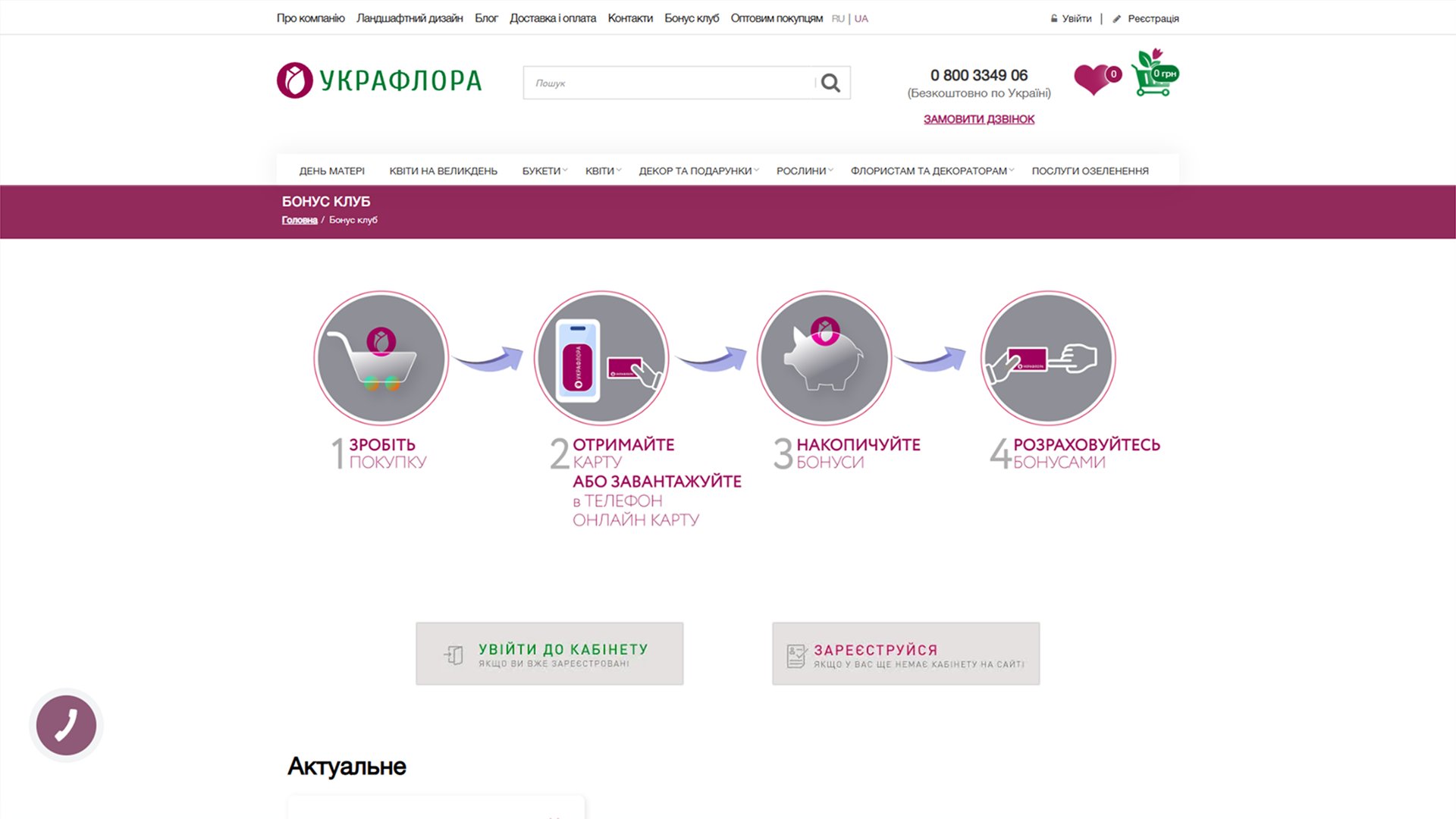
A dedicated "Bonus Club" page has been created on the website. The logic is explained in four simple steps, visible to the client immediately:
- Make a purchase
- Get a map or download an online map to your phone
- Accumulate bonuses
- Pay with bonuses
The page is integrated into the website's main navigation, next to the "Delivery and Payment" and "Contacts" sections. The app doesn't appear as a separate service—it's part of the website.
Program terms
- 5% of the total amount of each order is credited as bonuses
- 25 bonuses upon registration - welcome gift
- You can use accumulated points to pay up to 50% of your order amount
- bonuses are valid for 12 months from the date of accrual
User scenario
A customer orders a bouquet for 1,200 UAH. After payment, 60 bonus points are credited to their bonus card. They can use them as a discount on their next order. The card can be obtained directly on the website through the registration form. The card is stored on your phone (Apple Wallet / Google Wallet). The bonus balance is visible in your personal account on the website, without the need for additional apps.
Result
After just three months of the bonus program, the number of repeat orders increased by 30%, and the company's average bill as a whole increased by 12%.
Benefits for online business
- There's no need to print a physical card - the program works entirely online.
- Quick launch - from registration to the first customer card - one day
- No development required - the basic version runs without programmers
- Increased LTV - Customers participating in a loyalty program spend more on average and return more often
- Customer database - the program automatically collects contacts and purchase history
- Works through the website and social media - one tool for different channels
Common mistakes when launching a loyalty program
It's easy to launch a loyalty program, but it's also easy to make mistakes that can negate its benefits. Here are five common mistakes and how to avoid them.
- The terms are too generous at the start. A 30% bonus on every order seems attractive, but it eats into your margins. Start with 5-10% and adjust as you gain experience.
- The client doesn't know about the program. Launching the card is only half the job. You need to communicate it: a banner on the website, a mention during checkout, a post on social media. If the client doesn't know about the bonuses, they won't come back for them.
- No reminders. A customer accumulates 200 bonus points and forgets about it. An email or push notification, "You have 200 bonus points—enough for a discount on your next order," brings them back to the store. Take advantage of the communication opportunities offered by Wallet notifications.
- Complex terms. If a client can't explain how a program works in 10 seconds, the terms are too confusing. Simplicity is the key competitive advantage.
- Launching without analytics. From day one, monitor the data: how many clients participate in the program, what percentage returns, how the average order value changes. Without this, it's impossible to improve the program.
Conclusion
A loyalty program isn't just for large retailers. It's a tool that works at any scale: from an Instagram store with a few hundred followers to a full-fledged online store with thousands of orders per month.
If you already have traffic and customers, you're losing money without a loyalty program. Every customer who leaves without a card is a potential repeat order that will go to a competitor.
The launch takes one day. There are no technical barriers. The results are tangible: more repeat purchases, higher LTV, and lower dependence on advertising budgets.
Try launching a loyalty program for your business → efircards.com