NFC tags for business: how a single tap on a phone turns a guest into a loyal customer
In the past, to get a guest’s contact information, you had to convince them to fill out a form, download an app, or at least give you their phone number. Today, all you need to do is place a small tag on the table: the guest taps it with their phone and in a single second, they receive a digital loyalty card, bonuses, and a Telegram subscription.


What is an NFC tag?
NFC (Near Field Communication) is a wireless data transfer system that transmits data over distances of up to a few centimeters. It's the same technology that allows you to pay with your phone at the checkout. However, in our case, it works in reverse: instead of you paying, the business "gives" the customer something valuable a card, a bonus, a link, or access.
An NFC tag is a small chip in the form of a sticker, coin, stand, or key fob that, when touched with a phone, instantly opens a link stored inside, without requiring a camera, scanning, or any additional actions.
Simple formula: label → touch → action.
And it is precisely in this “action” that the whole business sense lies.


How NFC tags work in real business
Technically, it's all simple: a URL link is written into the chip, and when you touch it, the phone reads it and opens it instantly as if the user had clicked on the link in a browser.
Any smartphone owner can write a link to the chip it takes no more than five minutes:
1. Take an NFC tag (chip). The most common formats are NTAG213, NTAG215, and NTAG216. The simplest NTAG213 is sufficient for storing a single URL. You can buy these tags on AliExpress, Amazon, or at local electronics stores they're sold as stickers, coins, or keychains. If you need a beautiful branded holder with your logo, they can be custom-made, including using 3D printing.
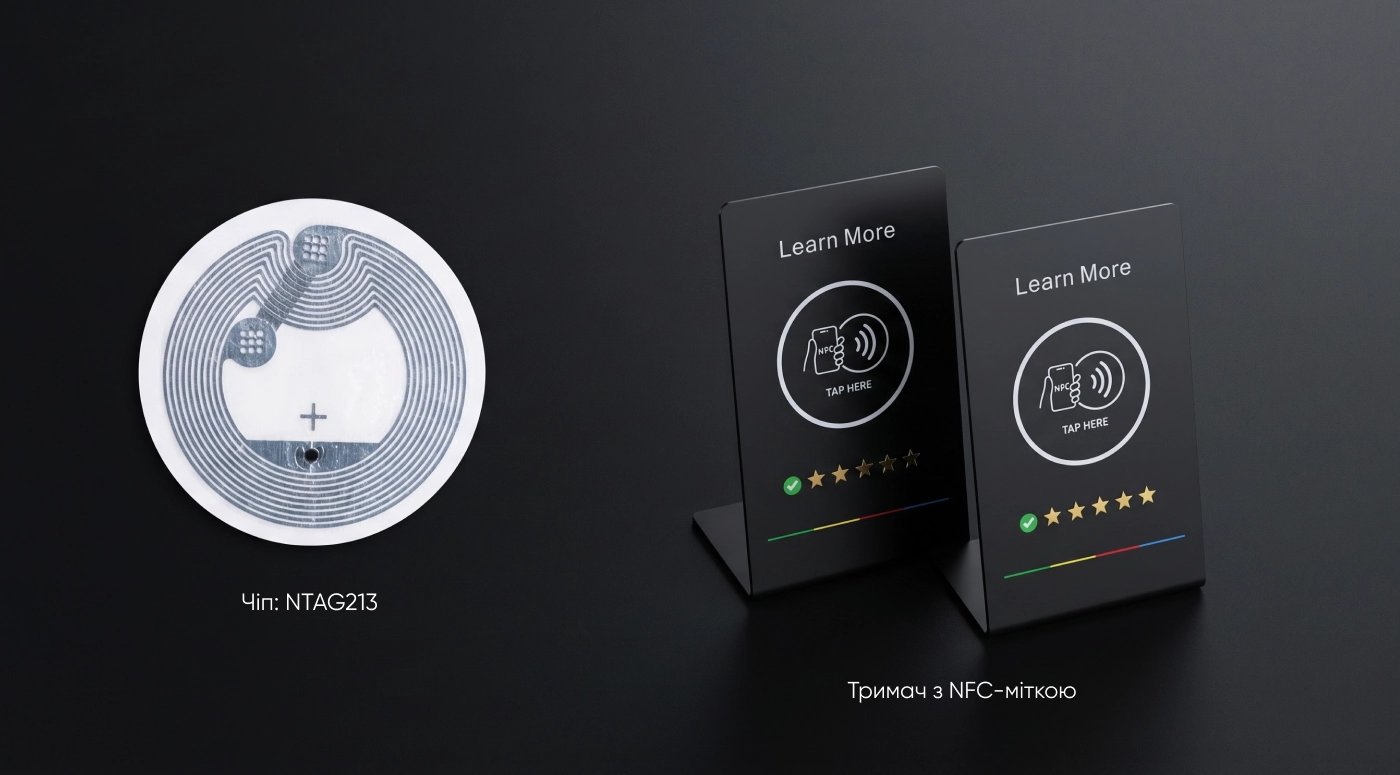
For example:
- Rozetka — NFC tags NTAG213
- ID Card is a specialized NFC tag store.
- AliExpress – NTAG213 NFC sticker
- ShopNFC — NTAG213 stickers
2. Install an NFC writing app. The most common ones are NFC Tools ( iOS / Android ) or NXP TagWriter ( iOS / Android ) – both are free.
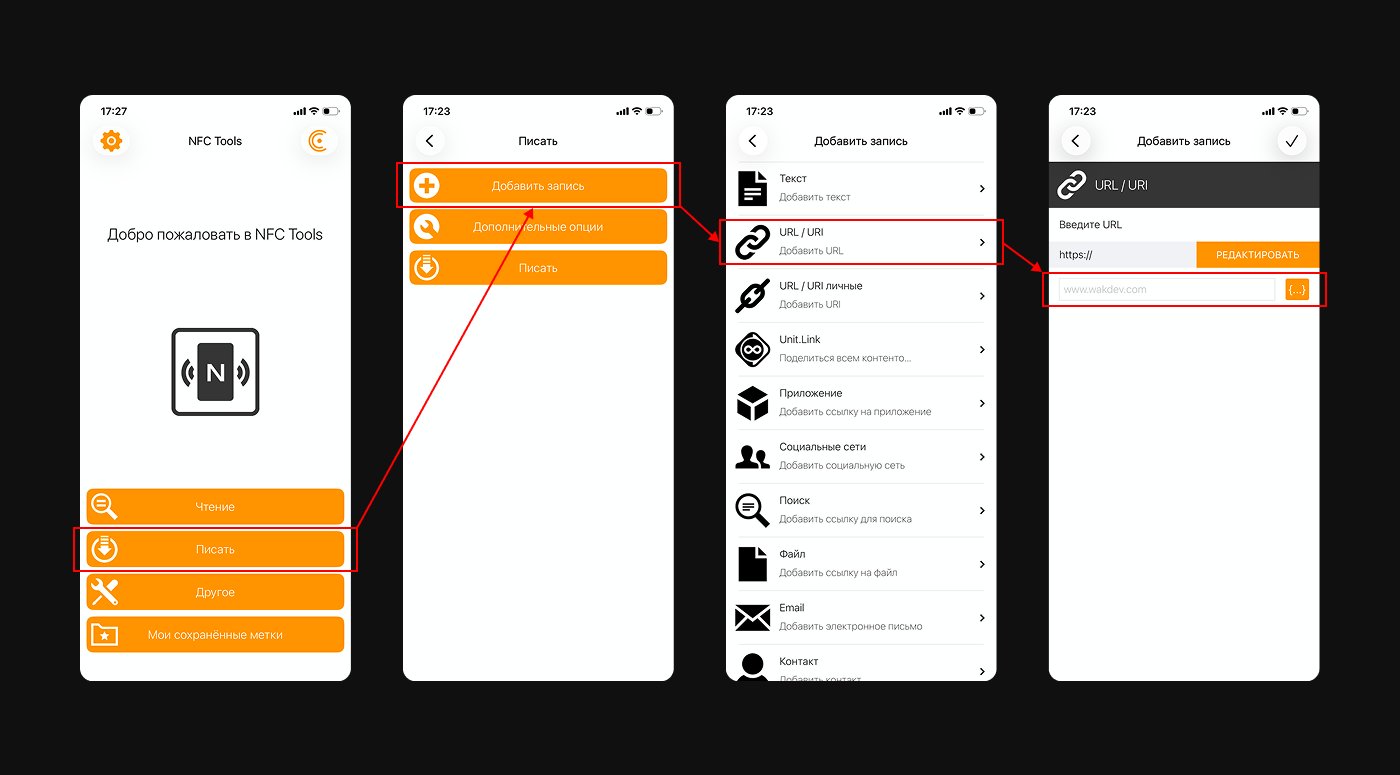
3. In the app, select the post type: URL / Link and paste the desired link. This could be a link to a Telegram bot, a Google Maps review page, a website, or a landing page with a promotion.
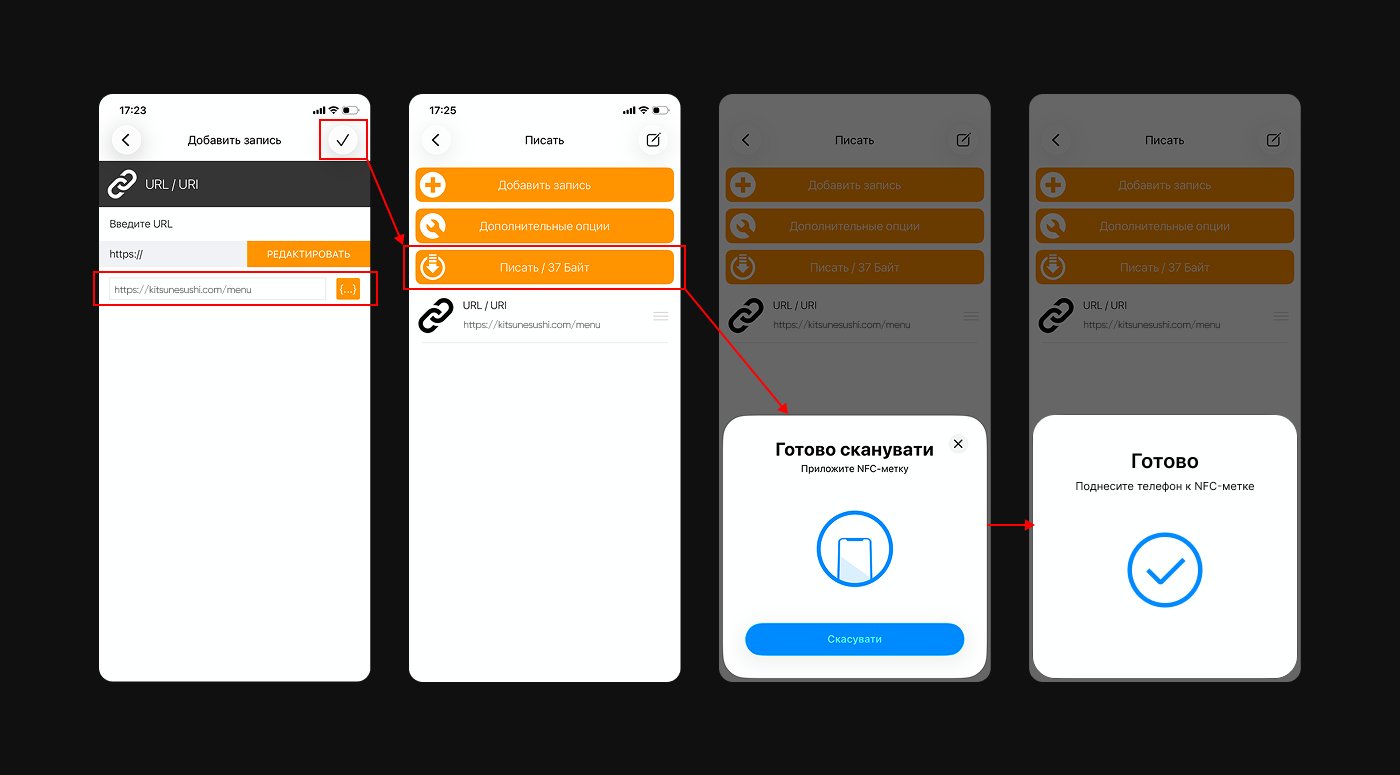
4. Place the empty tag on the phone – the application writes data to the chip in a few seconds.
5. If desired, protect the tag — you can block it from being overwritten by third parties, set a password to change it, or leave the option to update the link later without replacing the physical tag.
After this, the tag is ready to use. The guest taps it, and the phone opens the link.

How can NFC be used in business?
Scenario 1. Digital loyalty card
The customer taps the tag on the table or at the cash register with their phone → they are taken to the application page for receiving the card → in a few seconds, the card is saved directly to Apple Wallet or Google Wallet.
Next comes bonuses for each visit, push notifications about promotions, and personalized offers. Customers return because they have a reason to come back.
This mechanism is implemented using our Efircards service: the platform issues digital loyalty cards, accumulates bonuses, sends notifications, and maintains a customer database.
The NFC tag acts as an entry point into the system the guest gains access to the card and loyalty program with a single touch, without development, without an app, and without complex setup.

Scenario 2: Transition to Telegram
An NFC tag can link directly to a Telegram bot or the establishment's channel. The customer presses "Start" and is immediately connected to your communication system.
After that, you can interact with them directly: send promotions, reminders, personalized offers, and also create automated communication scenarios.
Telegram is one of the most effective and cost-effective customer retention channels today: high message open rates and instant delivery allow for regular customer retention without advertising costs.

Scenario 3: Transition to Instagram
An NFC tag can also link to an Instagram profile. In this case, the customer is directed to the brand's page, where they can subscribe, view content, reviews, and visuals of the product.
This works as a quick way to increase your following and build trust through content: users immediately see real-life case studies, the establishment's atmosphere, and are engaged in the conversation.
This scenario is especially effective for businesses where visual impact and regular interaction through stories and posts are important.

Scenario 4: Collecting Reviews on Google Maps
The pin leads to a form for publishing a review of your establishment on Google Maps, and satisfied guests find themselves instantly at the right place without having to search extensively on maps.
The fewer steps between the desire to leave a review and the review itself, the higher the likelihood that it will actually appear — meaning your ratings rise, new guests see real-life impressions from real people, and the customer acquisition cycle begins again.

Scenario 5. Promotions and special offers
The tag leads to a landing page with a promotion, coupon, or seasonal offer, and the guest sees the offer immediately after tapping it — without having to search for a QR code on the wall or sort through a flyer that's already crumpled and forgotten by the end of the evening.
The link inside the tag can be updated at any time without replacing the physical media: today it's "happy hour" with a free drink, tomorrow it's an announcement of the new seasonal menu, and the day after tomorrow it's a special offer for first-time visitors.

Scenario 6. Electronic menu
In recent years, QR codes with menus have become a familiar part of the restaurant experience — most guests already know to take out their phone, open the camera, and point it at the code.
NFC makes this same scenario even easier: no need to search for a code on the table, no need to open the camera and wait – just one touch, and the menu is already on the screen.
NFC vs. QR: What's the Real Difference?
A QR code is also a working tool, but it has nuances that directly affect conversion.
NFC tags offer greater flexibility in placement and format. They can be not just stickers, but any physical media: table coasters, keychains, cards, menus, table tents, stickers, or even themed elements integrated into the interior.
Tags can be either stationary (sticked to a table, cash register, or packaging) or portable for example, on staff or in the form of separate promotional media.
A QR code is often just a sticker or stamp, whereas NFC can be seamlessly integrated into any object and become part of the user experience.
The fewer steps between desire and action, the higher the conversion.
This is why, in establishments where NFC tags are located next to QR codes, customers are more likely to choose to tap.
| Characteristics | NFC | QR Code |
|---|---|---|
| Action | One-touch | Open camera, point, wait |
| Speed | Instant | 3–5 seconds |
| Convenience | No need to open camera | Requires a camera |
| Perception | Modern, high-tech | Familiar, but already “overused” |
| Conversion | Higher | Lower |
NFC + loyalty system: where is all the logic stored?
It's important to understand one thing: the NFC tag itself is simply a trigger. It doesn't store customer data, award bonuses, or perform analytics.
That's why the key question is not "should I buy tags?" but "what should I connect them to?"
Efircards is a ready-made platform that takes care of all the logic:
- Digital card issuance – the client receives the card in Apple Wallet / Google Wallet directly from their phone
- Accumulation of bonuses - the system automatically counts visits and awards points
- Push notifications – the client receives messages directly on the lock screen, without the need for an app
- Integration with Telegram - the communication bot connects to the same database
- Customer database - everyone who received a card is recorded in your personal account
All this works in conjunction with an NFC tag: the client touches it → enters your ecosystem → stays in it.

How to put this into practice: three simple steps
Businesses that are already using NFC typically do so like this:
- Tags are placed at touchpoints. Most commonly, these are on tables (in special holders), at the cash register, and on takeout order packaging. The tag should be located where customers naturally hold their phones or where they wait.
- Provide an incentive to tap. "Tap your phone and get a bonus on your next coffee" works better than simply "we have a loyalty card." The first tap should provide something immediate.
- Communication continues. The card is issued the client is now in the database. Next comes push notifications, a Telegram bot, and personalized birthday offers. A one-time visitor becomes a regular.

How much does it cost and how quickly can it be implemented?
This is perhaps the most pleasant moment.
An NFC tag (sticker or chip) costs a few cents in bulk. A beautiful 3D-printed holder costs a couple of dollars. This isn't an expense it's a one-time investment.
Recording a link takes 5-10 minutes from a regular smartphone using the NFC Tools app. No programmer or equipment required.
Connecting to Efircards doesn't require developers: the platform provides a personal account with ready-made card templates and built-in Telegram integration, so it takes no more than a few hours from registration to the first loyalty card issued to a guest.
Total: from idea to first client in the database – less than one working day.
Conclusion
Most offline establishments lose customers immediately after they walk out the door: the money spent on attracting them is spent, the contact is not made, and the next time they need to, they're just as likely to go to a competitor.
An NFC tag changes this logic. The first touch and the customer is already in your digital ecosystem: with a card on their phone, in a Telegram bot, in your database. Then you work with them systematically: remind them of your presence, return them, and increase their average order value.
Combining NFC with a digital loyalty card is one of the cheapest and fastest ways to build repeat sales in a brick-and-mortar business. It doesn't require an app, complex integration, or a large budget.